
MộcPDF
Your documents do not go anywhere.
Offline PDF tools and Vietnamese OCR for work that must stay on your device.
- Category
- Document Productivity
- Platforms
- Desktop
- Last update
01
Why it exists
Contracts, tender files and personal records often cannot be uploaded to online PDF services, yet the people handling them still need to split, merge, search and OCR scanned Vietnamese pages.
People either break policy by uploading sensitive files, or retype scanned text by hand.
02
What it does
Split with a preview
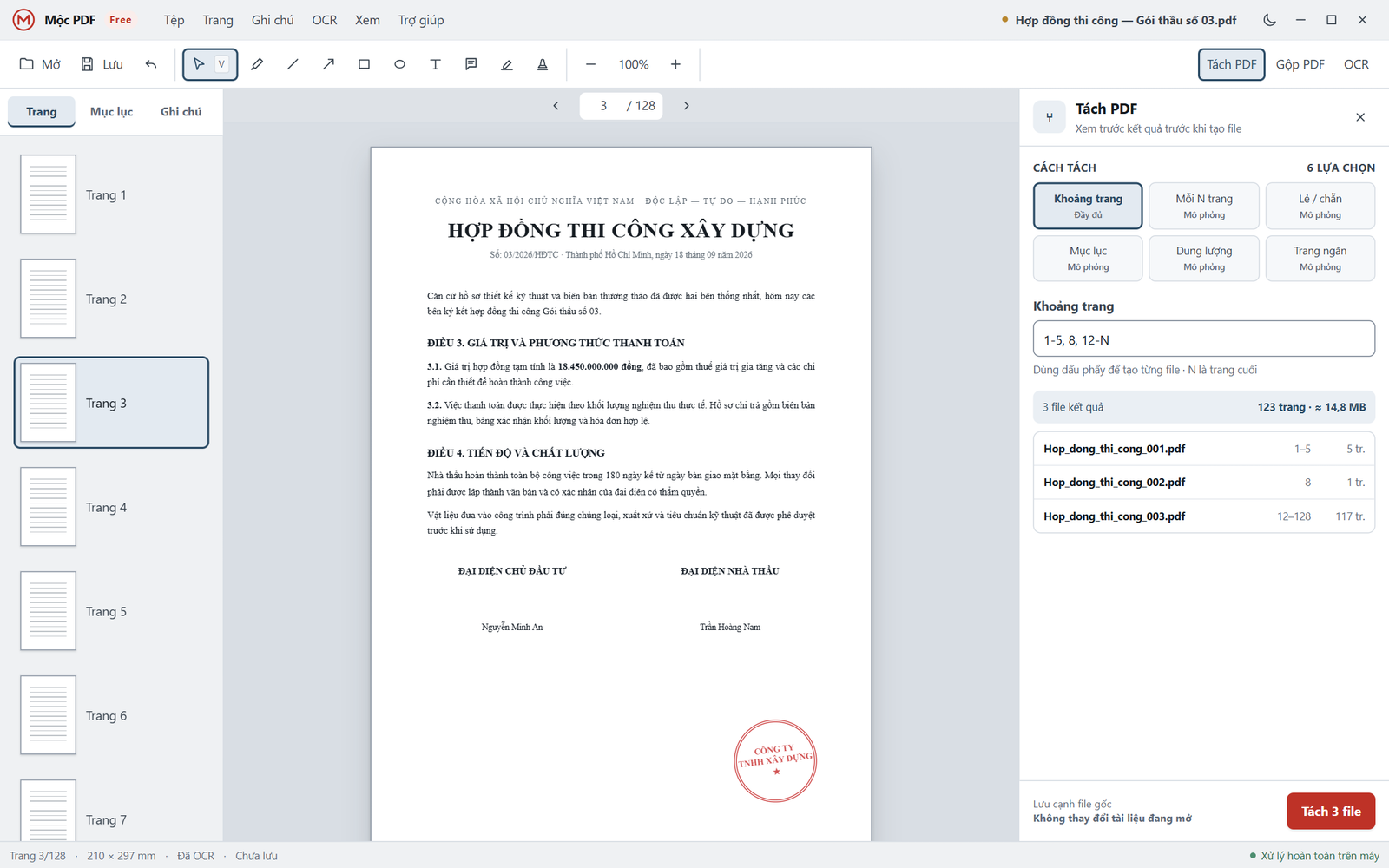
Type ranges such as “1-5, 8, 12-N” and see every resulting file, page count and size before anything is written.
Merge and organise pages
Order files, choose a range and rotation for each, and optionally create bookmarks. Reorder, rotate, duplicate or delete pages.
Vietnamese and English OCR
Preview image clean-up before recognition, then review suspicious words: yellow for 50–75% confidence, red below 50%.
Search with or without diacritics
“thanh toan” finds “thanh toán”, so clauses are found however they are typed.
Annotate
Pen, lines, arrows, shapes, text boxes, notes, highlights and stamps, each with a keyboard shortcut.
03
How it works
- 01In development
Open
Open a local PDF. Nothing is uploaded.
- 02In development
Organise
Split, merge or edit pages with a preview of the result.
- 03In development
Recognise
OCR scanned pages in Vietnamese and English.
- 04In development
Review
Step through low-confidence words with Tab and correct them.
- 05In development
Save
Results are saved beside the original file.
Example
A 128-page construction contract (sample document in the prototype): split it into pages 1–5, page 8 and page 12 to the end as three files, run Vietnamese OCR, review the two words flagged on page 3, then apply the text. The status bar reads “Processed entirely on this computer”.
04
What makes it different
Offline by architecture
Processing runs on the device, so privacy does not depend on a policy promise.
Uncertainty is shown
OCR marks the words it is unsure of instead of silently guessing, so review time goes where errors are likely.
Safe operations
Long jobs can be cancelled at any time, and splitting never changes the open document.
05
Current status
Active implementation is underway.
Currently building. A downloadable beta is not yet available.
Current limitations
- Not yet available to download.
- OCR accuracy benchmarks will be published with the first beta.
- Screens shown are a UX prototype; some split modes are still simulated.
06
Roadmap
Now
- Core PDF operations offline
- Vietnamese OCR quality model
Next
- Downloadable beta
Later
- Published OCR benchmark
No dates are shown unless they are committed.
07
Engineering and trust
Network behaviour
Document processing makes no network requests. This will be verifiable in the beta.
File fidelity
Split and merge results are saved as new files beside the original. The source is never overwritten.
08 · MộcPDF
Get the product
There is no build to download yet. Leave your email with a short note and you will hear when a test build is ready.